What We Learned Building a RAG System from Scratch (No Frameworks)
We built a retrieval-augmented generation (RAG) system entirely from scratch. No LangChain, no LlamaIndex, no abstractions hiding the details. Just Python, a vector database, and a few API calls. The goal was to build an AI assistant (GitQuest) that answers Git questions using official documentation, cites its sources, and says "I don't know" when it should.
Along the way, we ran into some sticky situations that changed how we think about building AI systems that ground their answers in real documentation. This post walks through what we built, what broke, and what we learned.
We turned the whole process into a hands-on course. If you want to build the entire system yourself, check out our Introduction to RAG in Python course.
What's in this post
- A quick demo of the problem RAG solves
- How a RAG pipeline works
- Building the first pipeline (and watching it hallucinate)
- When retrieval breaks down
- The failure that followed us everywhere
- How to debug a RAG pipeline
- The mindset that matters most
- Build it yourself
A quick demo of the problem RAG solves
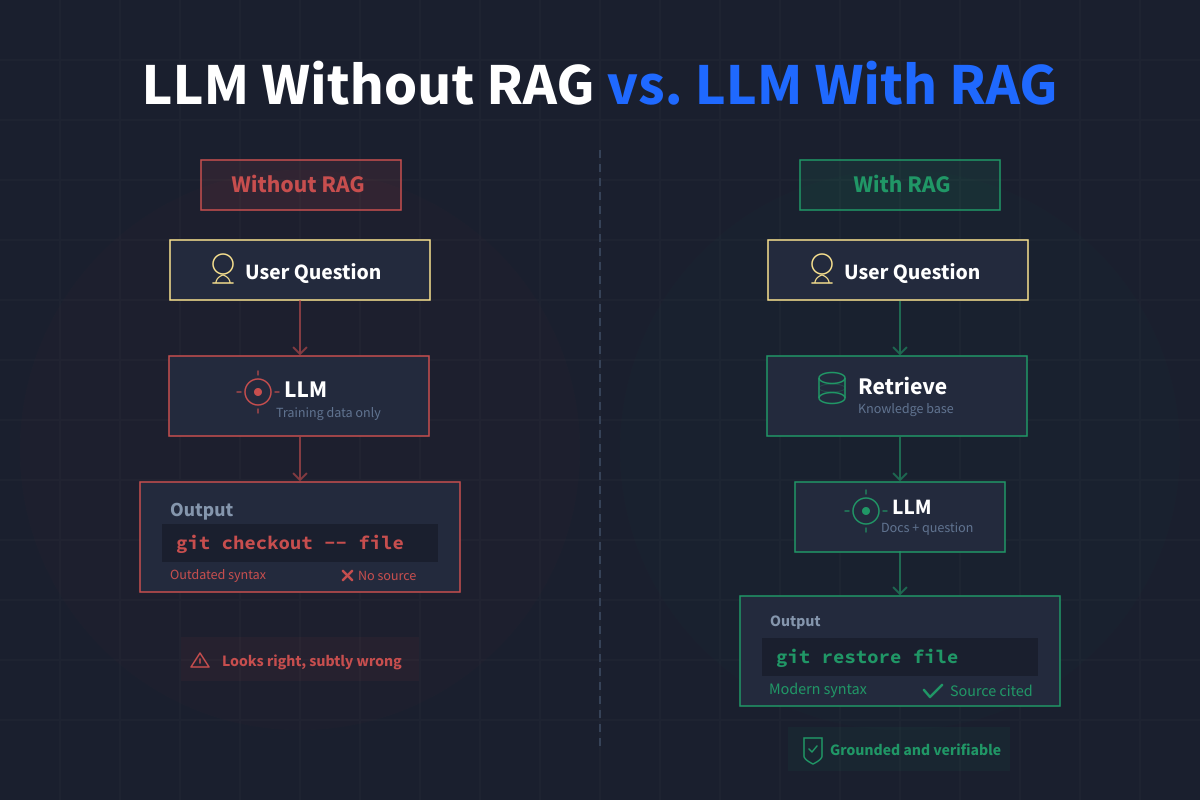
We used GPT-4o-mini throughout this project for its low cost per query and because its training data cutoff makes the vocabulary and grounding problems we encountered more visible. With no documentation attached and just a simple system prompt, if you try asking GPT-4o-mini how to discard changes to a file and restore it to the last commit, you'll get something like this:
You can restore a file to the last committed state using the following
command:

    git checkout -- path/to/your/file
That looks reasonable. And git checkout -- <file> does work. But Git's own documentation tells a different story.
Since Git 2.23, the recommended command for this operation is git restore. The checkout command does so many things (switching branches, restoring files, detaching HEAD) that Git introduced restore and switch specifically to make these operations clearer and less error-prone.
The LLM answered the query from memory, and its memory reflects common usage patterns from training data rather than what the documentation recommends today. The answer isn't dramatically wrong. It's subtly wrong in exactly the way that's hard to catch.
Now here's the same question answered by GitQuest, the RAG-powered Git support agent we built, after retrieving relevant chunks from the official Git documentation:
You can discard all the changes you made to a file and restore it to
the last committed state using the following command:

    $ git restore path/to/file

This command replaces path/to/file with the contents that it had in
the last commit, effectively discarding all local changes you made
since then.

SOURCE:
  [manual] b3a9662b3118d957 | Git User Manual :: Checking out an old
  version of a file
Same question, better answer, grounded in the official docs. And critically, the RAG version includes a citation pointing back to the exact documentation chunk it drew from, so you can verify the answer before running anything risky.
That's the core value of RAG. Not just a different answer, but a traceable one.
How a RAG pipeline works
Retrieval-Augmented Generation (RAG) gives a language model access to a knowledge base at query time so it can ground its answers in real documentation rather than relying on what it memorized during training.
The result is a system that:
- Answers questions accurately in your specific domain
- Cites its sources so users can verify answers
- Says "I don't know" when the documentation doesn't cover the question
The four-stage pipeline
Every RAG system follows the same basic flow:
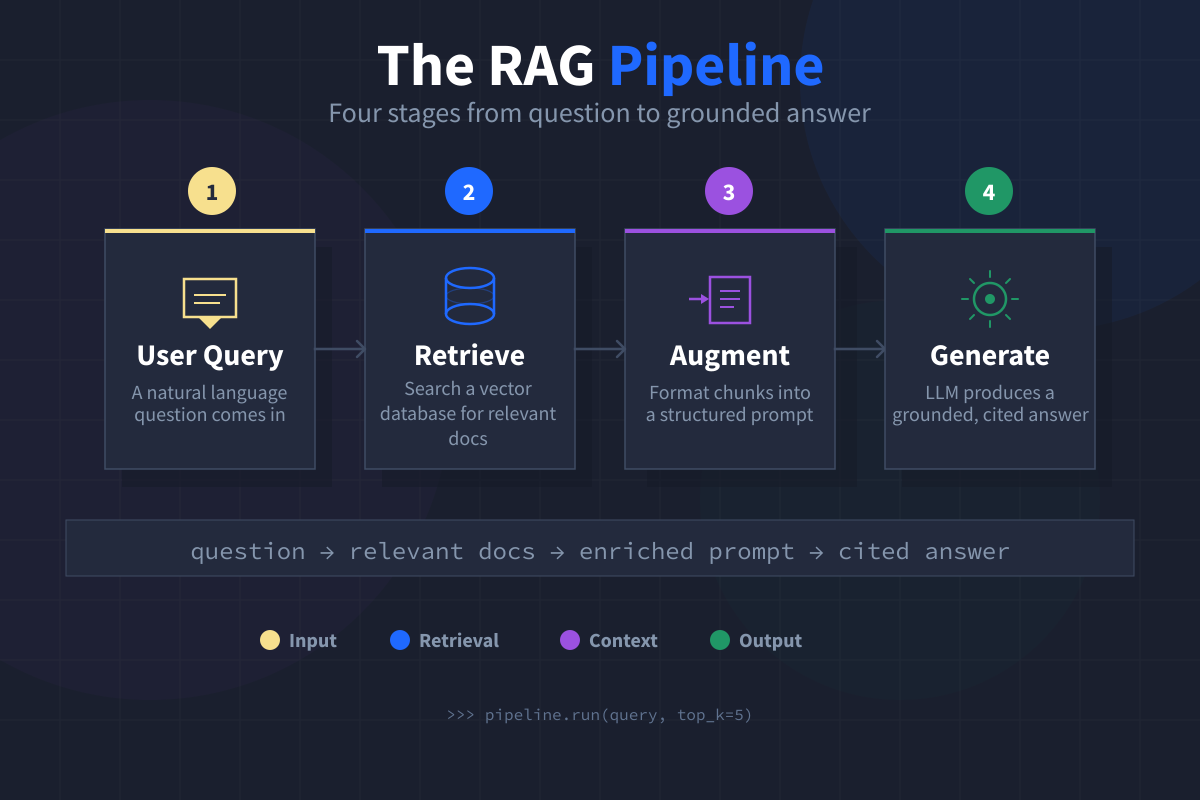
- User query. A natural language question comes in. No special formatting required.
- Retrieve. The query gets embedded into a vector and used to search a vector database for the most semantically similar documentation chunks.
- Augment. The retrieved chunks get formatted into a structured context block and injected into the prompt alongside the user's question.
- Generate. The augmented prompt goes to the LLM, which reads the provided documentation and produces a grounded answer with citations.
To make this concrete, we built ours on 334 chunks of official Git documentation drawn from the manpages for 27 core Git commands and chapters from the Git User Manual. Those chunks are pre-embedded and stored in a ChromaDB vector database, ready for querying.
If you want to explore the dataset on your own, you can download it here: Introduction_to_RAG.zip
Building the first pipeline (and watching it hallucinate)
The most instructive moment in the build process isn't when the pipeline works. It's when it confidently gives a wrong answer. A correct answer tells you the pipeline handled that query well. A confident wrong answer is more valuable because it reveals the pipeline's blind spots and the kinds of failures it won't flag on its own. Those are the answers worth paying close attention to, because from the outside they look identical to the good ones.
We ran into one of these early, and it changed how we designed the rest of the system.
Wiring the pipeline together
Once the basic pipeline is assembled, we have a retrieve() function that embeds the query with Cohere, searches ChromaDB, and joins results back to the corpus text:
def retrieve(query, n_results=5):
    response = co.embed(
        texts=[query],
        model="embed-v4.0",
        input_type="search_query",
        embedding_types=["float"]
    )
    query_embedding = response.embeddings.float[0]

    results = collection.query(
        query_embeddings=[query_embedding],
        n_results=n_results
    )

    chunks = []
    for chunk_id, metadata, distance in zip(
        results["ids"][0],
        results["metadatas"][0],
        results["distances"][0]
    ):
        chunk = corpus[chunk_id]
        chunks.append({
            "chunk_id": chunk_id,
            "text": chunk["text"],
            "title": chunk["title"],
            "source_type": metadata["source_type"],
            "command": metadata["command"],
            "distance": distance
        })
    return chunks
Every query goes through two steps. First, we embed it with Cohere to get its vector representation. Second, we search ChromaDB with that vector. Then we join each result back to corpus.jsonl using chunk_id as the key, so we get full text, metadata, and distance scores all in one place.
From there, the retrieved chunks go through a build_context() function that formats them into a structured prompt, and then the whole thing gets sent to GPT-4o-mini via the OpenAI Chat Completions API for generation.
What happens when the docs don't cover the question
With the pipeline assembled, we asked GitQuest a question about SSH key configuration. SSH keys aren't covered in our corpus at all.
Here's what comes back with a basic system prompt that just says "use ONLY the documentation provided":
To configure Git to use a custom SSH key for a specific host, you can
use the `core.gitproxy` setting in your Git configuration...
core.gitproxy is a real Git configuration setting, but it has nothing to do with SSH keys, and it doesn't appear anywhere in the retrieved chunks. The model found nothing useful in the documentation, so it reached for training data and produced a confident-sounding answer that would send a developer down the wrong path.
Fixing the hallucination with a better prompt
The fix turns out to be straightforward. Instead of only telling the model to use the documentation, we also name the specific behavior we want to prevent:
SYSTEM_PROMPT = """You are GitQuest, a Git support agent that helps \
developers use Git correctly and confidently.

Answer the user's question using ONLY the documentation provided below. \
Do not use knowledge from your training data.

Guidelines:
- Provide the exact command syntax as shown in the documentation
- If the provided documentation does not contain enough information to \
answer the question, say so explicitly rather than guessing or drawing \
on outside knowledge

Documentation:
{context}"""
After this prompt update, the same SSH question now produces:
The provided documentation does not contain enough information to answer
your question about configuring Git to use a custom SSH key for a
specific host.
That's the right answer. Adding a firm "say so rather than guessing" instruction doesn't hurt performance on questions that the pipeline can answer. It only activates when the documentation is insufficient.
This is a pattern that shows up repeatedly when building RAG systems. Prompt design for RAG isn't just writing clever instructions. It involves naming the specific failure modes you want the model to avoid.
When retrieval breaks down
The most persistent challenge we ran into wasn't generation at all. It was retrieval.
The vocabulary gap
Consider this query: "How do I unstage a file I accidentally added?" The answer we'd want is git restore --staged <file>, the modern recommended approach. But look at the vocabulary gap between the user's words and the documentation's words:
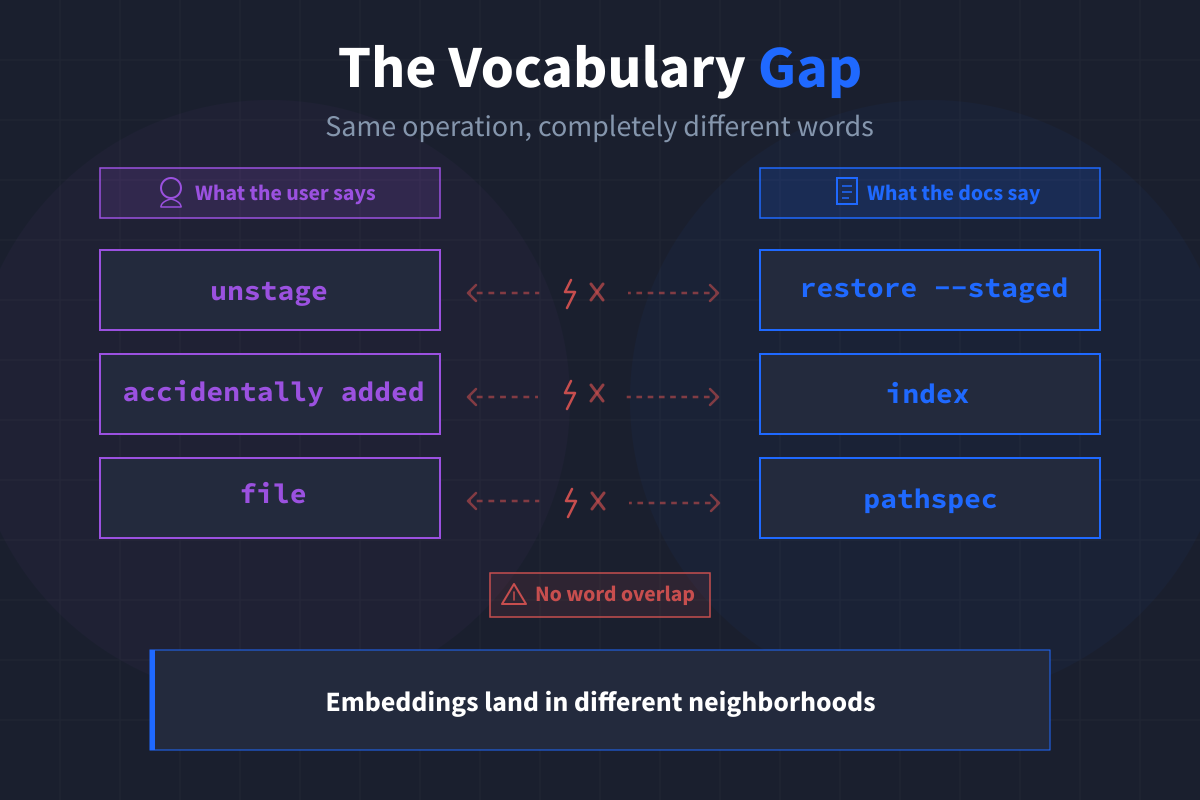
These describe the same operation, but they're phrased differently enough that their embeddings land in different neighborhoods of the vector space. When we searched for the unstage query in the top 20 results, the chunk containing git restore --staged didn't appear at all.
Closing the gap with multi-query expansion
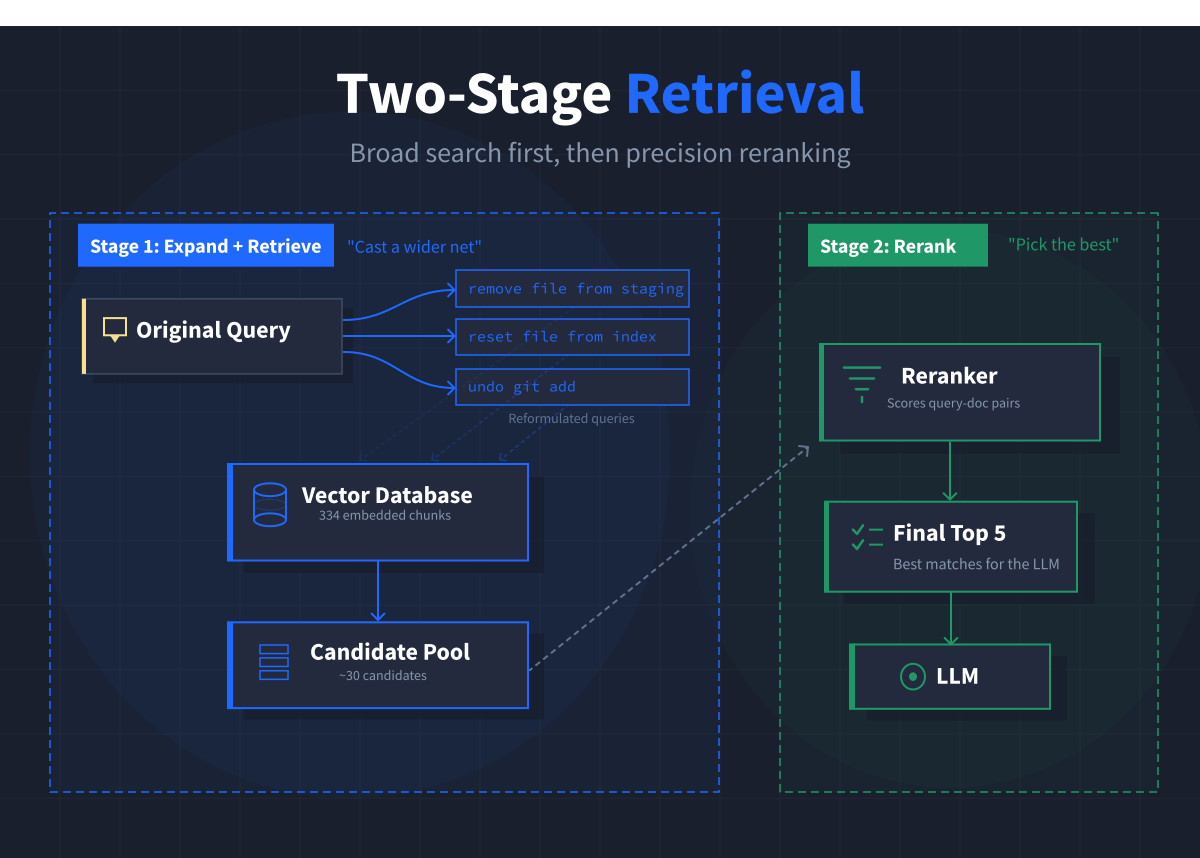
One approach to addressing this is multi-query expansion, where we use the LLM to generate alternative phrasings of the original query before searching. The reformulations introduce terminology closer to what appears in the documentation.
For the unstage query, expansion produced phrasings like "remove a file from the staging area" and "reset a file from the index after adding it," which brought the correct chunk from completely absent to rank 7 in the candidate pool.
Other retrieval improvements
We also experimented with HyDE (Hypothetical Document Embeddings), where you ask the LLM to generate what a documentation answer might look like, then use that hypothetical answer as the search query instead. HyDE worked well for some queries (it nailed git cherry-pick for a question about "moving commits between branches") but failed on others when the LLM reached for outdated patterns in its hypothetical answer.
To further improve precision, we added reranking with Cohere's Rerank API. This is a second retrieval stage that reads each query-document pair together and scores their relationship directly, rather than relying on vector distance alone. Reranking consistently improved which chunks made it into the final context sent to the LLM.
One of the three lessons in our Introduction to RAG course is dedicated entirely to retrieval and context management. It covers implementing both expansion strategies, wiring reranking into the pipeline, managing token budgets, and running a controlled experiment to find the optimal candidate pool size for a given corpus. If you're building a RAG system and finding that your answers are inconsistent, retrieval is almost always the first place to look.
The failure that followed us everywhere
The unstage query followed us through every retrieval technique we tried and never fully gave way. Even with multi-query expansion and reranking working together, here's what the final pipeline produced:
To unstage a file that you accidentally added, use the following command:

    git reset <pathspec>

This command updates the staged version of the specified file to
match HEAD, effectively unstaging it.

SOURCE:
  [manpage] 2b1fb47d19e40d62 | git-reset(1) :: NAME (part 1)
That answer is technically valid. git reset does unstage files. But it's not the modern recommended approach, and nothing in the pipeline's output signals any uncertainty.
A user following this advice wouldn't know they were getting a technically correct but outdated answer.
Why this failure matters
The pipeline didn't fail loudly. It produced a confident, well-formatted answer with a citation. Everything looked right. The problem was invisible unless you already knew what the better answer should be.
A RAG system's scariest failures are the ones that look like successes.
How we fixed it
We addressed this with a prompt-level fix. The key change was adding a single guideline that tells the model to treat the retrieved documentation as the current recommended practice:
SYSTEM_PROMPT = """You are GitQuest, a Git support agent that helps \
developers use Git correctly and confidently.

Answer the user's question using ONLY the documentation provided below. \
Do not use knowledge from your training data.

Guidelines:
- Provide the exact command syntax as shown in the documentation
- Briefly explain what the command does and why it works
- If there are important options or variations shown in the docs, mention them
- If the provided documentation does not contain enough information to \
answer the question, say so explicitly rather than guessing or drawing \
on outside knowledge
- Treat the provided documentation as the current recommended practice, \
even if you are familiar with alternative approaches from your training

Documentation:
{context}"""
That last guideline is the one that made the difference. After this update, the pipeline correctly recommended git restore --staged:
To unstage a file that you accidentally added, you can use the
following command:

    $ git restore --staged <file>

This command reverts the git add operation for the specified file,
removing it from the staging area while keeping the changes in your
working directory.

SOURCE:
  [manpage] d5237eadab2f87ed | git-restore(1) :: NAME (part 4)
The journey to get there taught us something more valuable than the fix itself. The pipeline won't tell you when it's giving a subtly wrong answer. You have to build the tools and habits to catch those failures yourself.
How to debug a RAG pipeline
When a RAG system gives a wrong answer, the instinct is to blame the LLM. It hallucinated. It ignored the prompt. It made something up.
While some of that might be true, it's often not where the problem started. The LLM can only work with what it receives. If retrieval returned the wrong documents, the generation stage never had a chance.
Five failure modes we found
Through this process, we identified five common ways a RAG pipeline can break:
- Vocabulary mismatch in retrieval, where the user's language doesn't overlap with the documentation's terminology
- Source-type mismatch in retrieval, where the right topic surfaces but from the wrong kind of document (a conceptual overview when the user needed command syntax)
- Hallucinated content in generation, where the model fills gaps from training data rather than staying silent
- Parametric override in generation, where the model's familiarity with a common task is strong enough to compete with what the retrieved documentation says
- Citation errors in generation, where the model cites a chunk that either wasn't retrieved or doesn't support the specific claim being made
These five failure modes fall into two categories: retrieval problems (covered by Steps 1 and 2 of our checklist below) and generation problems (covered by Steps 3 and 4).
The four-step diagnostic checklist
We developed a checklist for tracing any bad answer back to its root cause:
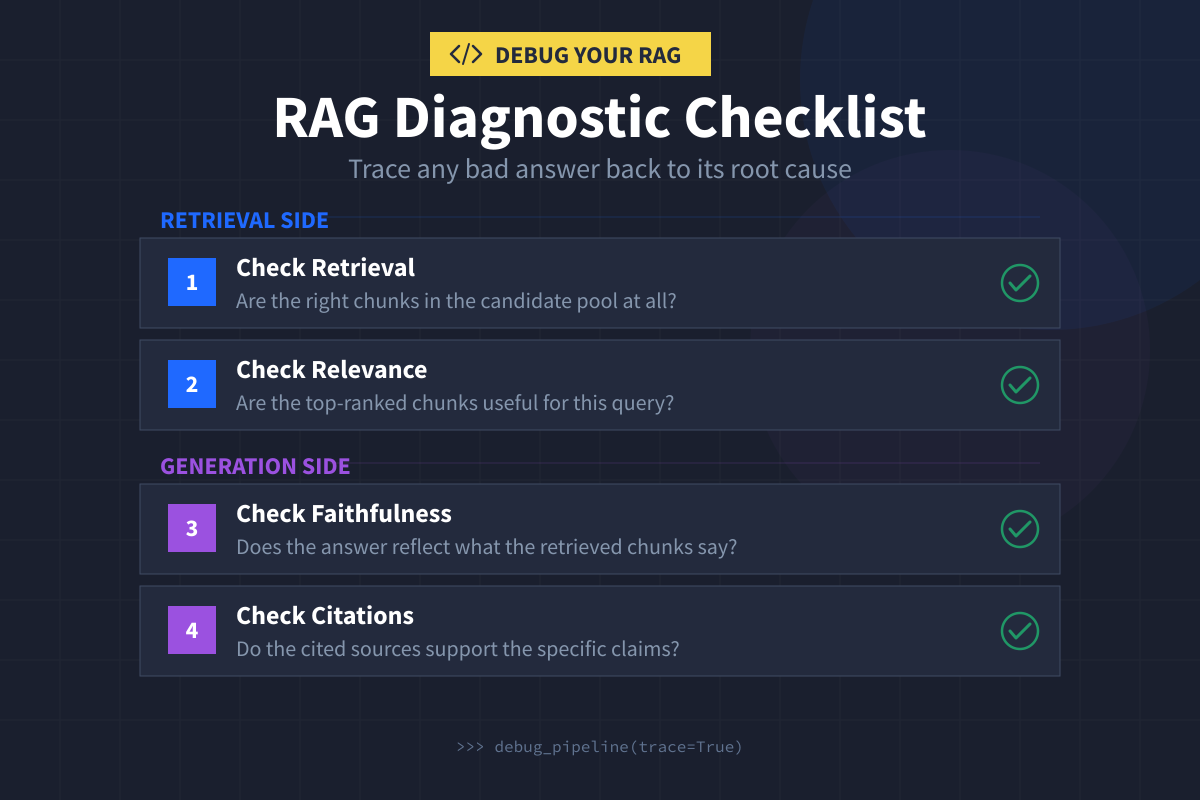
- Step 1: Check retrieval. Are the right chunks in the candidate pool at all? If the relevant documentation never made it into contention, nothing downstream can fix it. Vocabulary mismatch is the most common culprit here.
- Step 2: Check relevance. Even if the right chunks are present, are they ranked highly enough to reach the LLM? We found cases where a chunk titled "Git User Manual :: Goodbye" ranked first for a merge conflict query. The title was misleading, but the content was relevant. Always verify by reading the chunk text, not just the title.
- Step 3: Check faithfulness. Does the answer reflect what the retrieved chunks say? This is where parametric override shows up. If the answer recommends a command that doesn't appear in any of the retrieved chunks, that's a red flag.
- Step 4: Check citations. Do the cited sources support the specific claims being made? Citation validation has two layers. The automated layer confirms the cited chunk was retrieved. The manual layer confirms the chunk's text actually supports what the answer says.
This checklist works on any RAG pipeline, not just the one we built. If you're getting bad answers, work through these four steps in order. More often than not, the problem started in retrieval.
The mindset that matters most
The goal of building a RAG system from scratch isn't just to get a working pipeline, although that is quite satisfying. Instead, your goal should be to build the analytical habits that help you catch failures your pipeline won't surface on its own.
Whether you're building a customer support agent, an internal documentation search tool, or a code assistant, the same four questions apply:
- Are the right documents making it into the candidate pool?
- Are they ranked well enough to reach the LLM?
- Does the answer reflect what those documents say?
- Do the citations hold up when you read the source text?
Every insight in this post came from building the system ourselves, running real queries, and tracing the results back through the pipeline when something didn't look right:
-
The unstage query taught us that a confident, well-cited answer can still be subtly wrong.
-
The SSH key hallucination taught us that naming the behavior you want to prevent is more effective than hoping the model will figure it out.
-
The "Goodbye" chunk taught us that surface-level inspection (reading titles instead of text) can lead us to the wrong diagnosis.
Building from scratch is what gave us that understanding. When every component is wired together explicitly, you can trace any failure back to its source. That's the kind of visibility that matters when your system is giving confident answers that might be wrong.
Build it yourself
We turned this entire process into a hands-on course where you build GitQuest from a blank Python file to a working system with retrieval, reranking, context management, and diagnostic tooling. Each lesson includes a browser-based IDE you can start coding in right away, and we walk you through setting up your own local environment step by step if you prefer working on your own machine.
If you've ever had a RAG system return something plausible, well-cited, and still subtly wrong, that's exactly the problem our Introduction to RAG course is built around. You'll learn how to catch those failures and fix them, from the ground up.
Want to read more?
Check out the full article on the original site